
Summer Storms at Home: What to Unplug and What to Keep Running in Frederick County
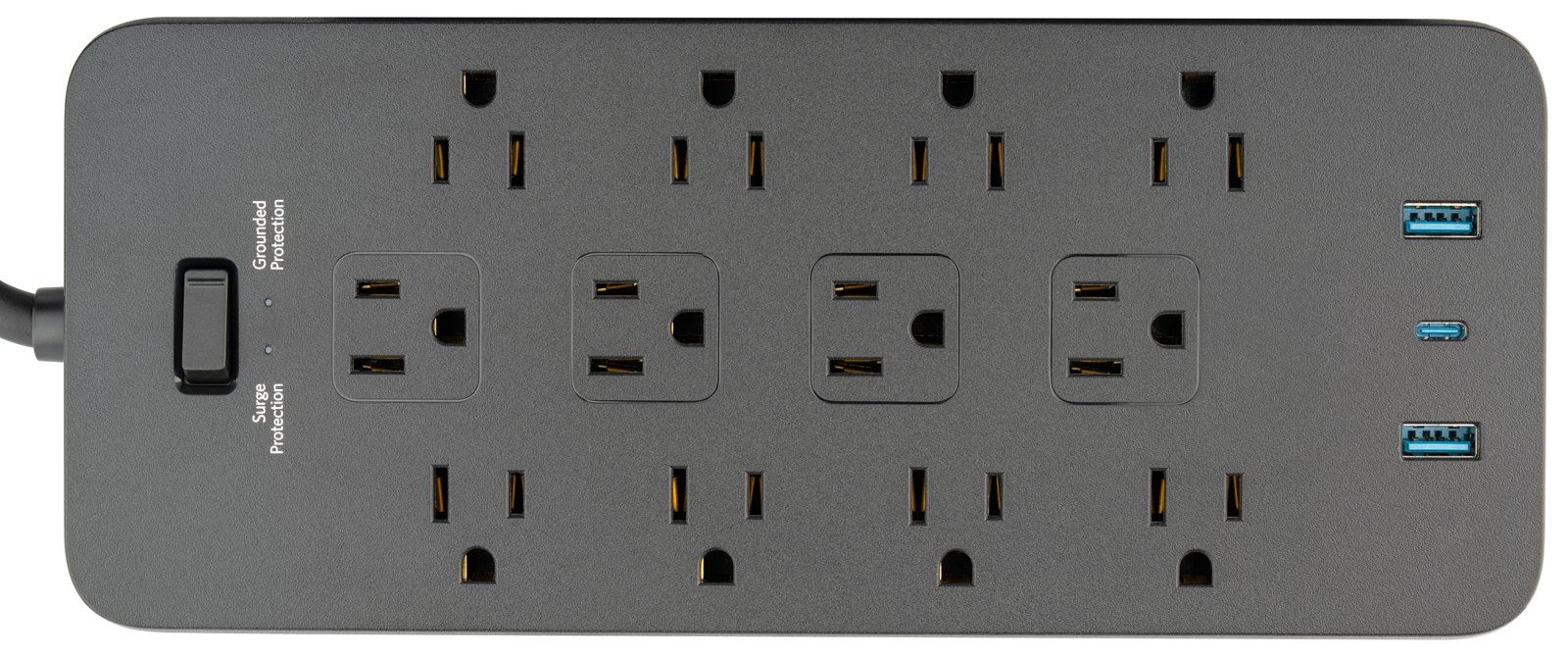
Skits here. We had a Tuesday afternoon storm last week that took out three modems on the same block. None of them had surge protection. All three calls came in Wednesday morning. Predictable. Preventable.
Summer storms in the Shenandoah Valley come fast and hit hard. The Doppler shows up green and yellow, then five minutes later there's a wall of rain and the lights flicker. Here's what I want every Winchester homeowner to have in place before the next one rolls through.
The $25 box that pays for itself in one storm
A surge protector. Not a power strip — those are different. A power strip just splits the outlet. A surge protector has a joule rating on the label (look for 1,000 joules or higher for anything that matters) and an indicator light that tells you it's still alive.
$25 at Lowe's or Home Depot. Anything you care about — computer, modem, router, TV, the printer that drives you crazy — should be behind one.
Surge protectors expire (most people don't know this)
Most surge protectors are rated for 5 to 7 years. After that, the protection element inside is worn out. The strip still works as a strip. It just stops protecting.
If yours predates the last presidential election — replace it. The plastic looks the same. The protection isn't. (Many newer ones have an indicator light that turns off when protection is gone. Worth a glance behind the entertainment center this weekend.)
What to unplug when a storm is coming
If you're home and a storm is rolling in, the safest thing is to pull the plug on what you don't need running. Even a good surge protector can take a direct lightning hit and let damage through. Unplugged equipment is unhittable.
What to unplug:
- The computer (yes, even the desktop — especially the desktop)
- The TV
- The printer
- The router and modem (yes, you'll lose internet for a bit; you'll also still have a router and modem afterward)
- Anything expensive plugged into an outlet near a window
What to leave running:
- The fridge and freezer (unless the power is already out)
- The security system if you have one
- Medical equipment
When the power comes back — the order matters
Don't just flip everything on at once. The order saves you an hour of "why won't the WiFi work?":
- Modem first. Wait until ALL its lights settle (could be 2 to 5 minutes). The modem is your connection to the outside world.
- Router next. Wait another minute. The router is what your home devices connect to.
- Everything else. Computers, printers, smart TVs, the streaming box, the works.
If you start everything at once, sometimes the router hands out addresses to your devices BEFORE the modem has its internet connection up — and you end up with everything "connected" but nothing actually online. Two minutes of patience.
(We cover the modem-vs-router question, and what to do when the WiFi is dragging, in the Slow Internet microcourse. 10 minutes.)
Take a photo of the back of the router today
I'm serious. Right now. Pull out your phone and take a picture of the back of the router and the back of the modem. Label which cable goes where. Save it in your photos app under "house tech."
The next time the storm knocks something loose, you don't have to guess which plug went into which port. The grandkids on FaceTime won't have to wait while you try to remember.
The not-cheap-but-worth-it stuff
If you want to go a step further:
- A UPS (uninterruptible power supply) for the modem and router. Battery in a box. Power blinks, your internet stays up for 15–30 minutes. Means you can still FaceTime the grandkids during a short outage, or finish what you were doing before a clean shutdown. $80–$150 for a home setup.
- Whole-home surge protection at the breaker box. About $300 installed by an electrician. Catches the big hits before they reach your outlets. If you've ever had two storms in one summer take out appliances, this pays for itself fast.
If the worst happens anyway
Sometimes lightning wins. If a storm fries your modem, your router, or your computer:
- If it's just the modem — call your internet provider (Comcast, Glo, whoever). They'll replace a fried modem free in most cases. Don't buy a new one until you've asked.
- If it's your computer — STOP. Don't keep plugging it in to "see if it'll come on." Pull the power, leave it alone, and call us. 540.303.2410. Your photos and files are usually recoverable IF you stop before you make it worse.
- If your backup was on the external drive plugged into that computer — we need to talk about why backups should live in at least two places.
For the grandkids visiting this summer
Quick bonus — if grandkids are coming for a week and you want them on WiFi without giving up the keys to the kingdom: turn on the GUEST network. Most routers have one built in. Give them THAT password. When they leave, you can change just the guest password without touching anything else.
Stay safe out there. Wishing you boring weather. 540.303.2410 if a storm catches you off guard.
— Skits
Need a second set of eyes on any of this? Give Jerry a call at 540.303.2410. We do this with Winchester-area clients all summer.
If a storm already got to something and the machine will not start, do not keep power-cycling it. Computer repair in Winchester VA can tell you what survived before you replace anything.