A 10-Minute Micro-Course with Skits, Your Shared Knowledge Sidekick
QR codes aren't just a tech novelty — they're one of the cheapest, most effective marketing tools a small business can use. Let's put them to work for you.
In the 101 course, we learned how to scan QR codes. Now it's time to flip the script — let's learn how to use them to grow your business. And the numbers might surprise you.
But first — what's your name?
You don't need to teach your customers anything. They're already doing it:
That last one is the kicker. QR codes are free to make, cost almost nothing to deploy, and your customers already know how to use them. There aren't many marketing tools where you can say all three of those things.
Prerequisite: This course assumes you already know how to scan a QR code. If you haven't taken QR Codes 101 yet, start there first — it takes about 10 minutes.
Getting Google reviews is hard. Asking people in person is awkward. Texting them a link works sometimes. But putting a QR code in front of them at the right moment? That changes everything.
Why does it work so well? Because you're catching people at the exact moment they're happiest — right after you helped them, fixed their problem, or served them a great meal. Their feelings are fresh and they have their phone in their hand.
A small sign or table tent right where they pay. This is the highest-performing placement — 15–20% scan rate. Customers are standing still, phone is accessible, and they just had a positive experience.
A small card they take with them — in a bag, stapled to a receipt, or handed with their keys. Lower scan rate than point-of-sale, but it reaches people when they're relaxed at home and have more time to write a thoughtful review.
Print it right on the receipt or email invoice. They're already looking at the document — put the QR code where their eyes naturally go.
Include the QR code image in a thank-you or follow-up email. If they're reading on a computer, they can scan it with their phone. If they're on their phone, include a clickable link too.
Pro tip: Add a simple message next to the QR code: "Loved your experience? Scan here to leave us a quick Google review — it really helps!" A friendly ask paired with the QR code performs better than the code alone.
SKTS can create one for you, print it on cards and signs, and have it ready to go in a single visit.
If you have a list of products, services, or prices, a QR code lets customers browse it on their own phone without you having to print (and reprint) anything.
But this isn't just for restaurants. Any business with a list of offerings can use this approach:
Salons, spas, auto shops, cleaning services — put a QR code in your window or waiting area that links to your full service list with prices. Update it anytime without reprinting.
Retail shops, bakeries, florists — link to a visual catalog or online store. Customers can browse your full selection even if you only have a few items on display.
Put a QR code on product packaging or display tags that links to instructions, recipes, care guides, or how-to videos. This replaces the tiny print nobody reads.
Link to a page you update regularly with current specials, seasonal items, or limited-time offers. The QR code never changes — just the content behind it.
The key advantage: You print the QR code once. When your prices change, your menu changes, or you add new services, you just update the web page. The QR code still works — it points to the same address, which now shows updated content.
You know you want a QR code on your business card, but what should it link to? Your website? Your Google reviews? A product page? The answer depends on what you're trying to accomplish.
Don't try to make one QR code do everything. Choose the one action you most want someone to take after meeting you, and link to that.
One scan and your name, phone number, email, and address are saved directly into their phone contacts. No typing, no losing the card, no forgetting your name.
Link directly to your appointment scheduler. They met you, they're interested — let them book right now while the conversation is fresh.
Turn every business card into a review opportunity. Hand it to a happy customer and say "If you have a minute, I'd love a quick review."
The classic choice. Let them explore what you offer at their own pace.
Link to your Facebook, Instagram, or LinkedIn page. Builds an ongoing relationship instead of a one-time visit.
Show off your work. Link to a gallery, product page, or portfolio. Let the work speak for itself.
Common mistake: Linking to your homepage when you should link to a specific page. If someone just met you at a networking event, don't send them to a generic homepage where they have to dig around. Send them to a page that does one thing — save your contact, book an appointment, or see your services.
Pro tip: Print a small label next to the QR code that tells people what it does. "Scan to save my contact" or "Scan to book an appointment." A QR code without a label is a mystery box — and most people won't scan a mystery box.
QR codes work on paper, stickers, signs, screens, T-shirts — any surface with enough contrast for a camera to read. And size? On the small end, keep it at least an inch. On the large end? There's no limit. A billboard works just fine.
Customers see it walking by. Link to your hours, menu, or "about us" page.
Replace long URLs with a clean QR code. Much easier than typing.
Link to instructions, recipes, warranty registration, or how-to videos.
Your truck is a mobile billboard. A QR code on the back lets someone scan at a red light.
Perfect for Google reviews, menus, or loyalty programs. They're standing still — great scan rate.
They're already reading it. Add a review QR code or a link to your referral program.
Works at any size. A QR code on a billboard is scannable from surprisingly far away.
Sticker on a laptop, magnet on a fridge, printed on a T-shirt. Gets your code out into the world.
QR codes aren't just for print. They work on any screen someone can point a phone at:
Put a QR code on your PowerPoint or Google Slides. Audience scans from their seat to get a handout, link, or contact info.
Waiting room TVs, in-store digital displays, or even a TV commercial. If it's on screen long enough to scan, it works.
YouTube videos, Facebook videos, TikToks — add a QR code on screen. Viewers watching on a computer can scan with their phone.
Running a Facebook or Instagram ad? Add a QR code in the image or video. People scrolling on their laptop can scan with their phone to go straight to your booking page or offer.
Share a QR code during a video call. Attendees scan it to get a link, download a file, or save your contact info.
Size rule of thumb: On the small end, keep QR codes at least 1 inch (2.5 cm) square for reliable scanning. On the large end, there's no limit — a QR code on a banner, poster, or billboard works great. Bigger just means it's scannable from farther away.
Each question describes a business goal. Pick the best QR code strategy to accomplish it.
Free QR codes work perfectly fine for most small businesses. Paid services add some bells and whistles that are nice but not essential. Let me break it down.
| Feature | Free QR Codes | Paid QR Services |
|---|---|---|
| Cost | $0 | $5–$25/month |
| Works forever | Yes | Yes (while subscribed) |
| Change where it goes | No — link is baked in | Yes — update anytime |
| Track how many scans | No | Yes |
| Custom colors/logo | Basic | Full branding |
| Need to reprint if URL changes | Yes | No — just redirect |
Bottom line: Start with free. For most small businesses, a free QR code that links to your Google review page, website, or booking page is all you need. If you outgrow it, paid options are there.
You don't need special software, you don't need to hire anyone, and you definitely don't need to understand how QR codes work on the inside. Let me show you the two fastest methods.
If you use Google Chrome or Microsoft Edge, you can create a QR code for any web page in seconds:
Open your website, Google review page, booking page, or any page you want the QR code to go to.
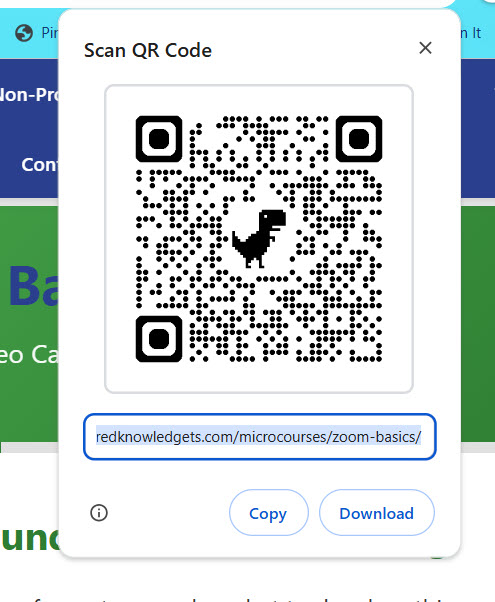
A menu will pop up. Look for "Create QR code for this page" (Chrome) or "Create QR Code for this page" (Edge).
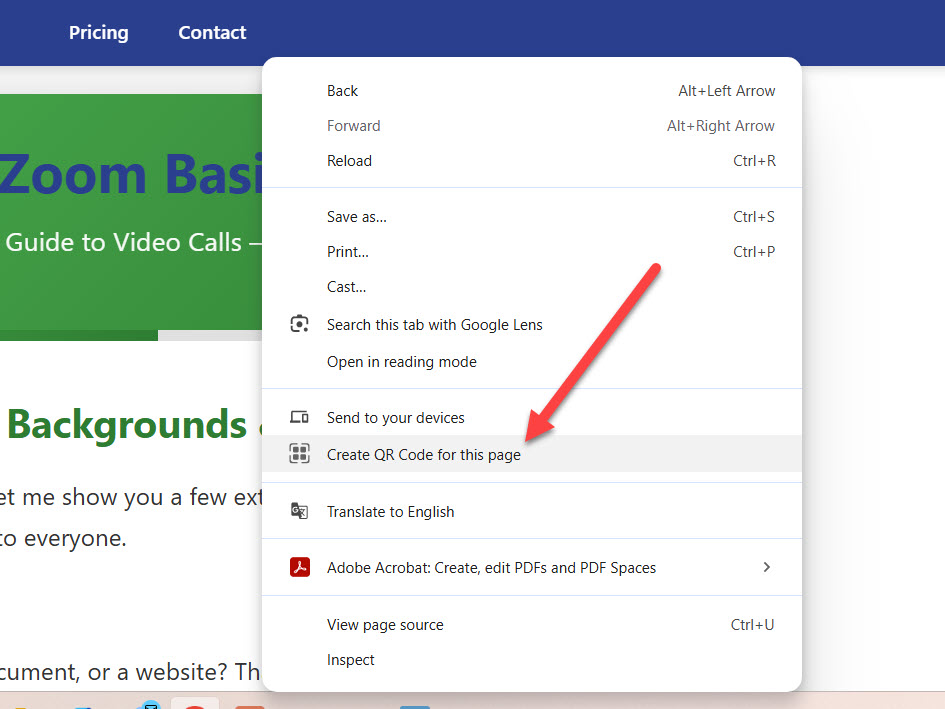
A QR code image appears. Click "Download" to save it as a PNG image file. You can now print it, email it, or paste it into any document.
If you want more options (custom colors, vCards, or different formats), use a free online tool:
Search Google for "free QR code generator" — there are dozens. Popular options include QR Code Generator, QR Code Monkey, and Canva.
Most generators let you pick: URL (website link), vCard (contact info), Phone number, Email, or Text.
Type or paste in the URL, phone number, or contact info you want the QR code to contain.
Click Generate, then Download. You'll get an image file you can print, email, or insert into documents.
Important: Always test your QR code before printing. Scan it with your phone to make sure it goes where you intended. Test it again after printing — print quality matters. A blurry or too-small print might not scan.
QR codes are simple, but there are a few ways to waste your money or frustrate your customers. Here are the big ones.
A QR code sitting by itself with no text around it is a mystery. People don't scan mysteries.
Everyone scanning your QR code is on their phone. If your website looks broken on mobile, you just made a terrible first impression.
Your QR code says "Scan to book an appointment" but it links to your homepage. Now they have to dig around to find the booking page. Most people won't bother.
A QR code smaller than about 1 inch (2.5 cm) may not scan reliably, especially in dim lighting or from an angle.
A light gray QR code on a white background, or a dark blue on black — cameras can't read them.
You print 500 flyers and the QR code links to the wrong page. Or worse — a broken page.
The checklist before you print:
If you can answer yes to all six, you're ready to print.
You now know how to use QR codes to get more Google reviews, market your services, make your business cards work harder, and reach customers on every surface from stickers to screens. And the best part? It costs almost nothing to get started.
Go make your first QR code. Right now. It takes 30 seconds.
Put Your Knowledge to Work!
You just learned all about QR codes for business — so here's one in action. Scan the code below with your phone to leave us a quick Google review. It really helps!
Or click here if you're on your phone already.
Now go generate that first QR code — your business is about to look very 21st century.
We can create, print, and deploy everything — Google review cards, counter signs, business card codes, window decals, the works.
We can help with:
540.303.2410
Shared Knowledge Technical Solutions
We don't just fix computers — we educate.
Get monthly tech tips, security alerts, and exclusive offers delivered to your inbox.